AI-Powered Design Systems in 2026 Are Changing Everything (Here's How)
AI is transforming design systems from static component libraries into intelligent, self-generating ecosystems. A practical look at tools, workflows, and what's real.

I've been running a design system for the past three years. And up until about six months ago, the workflow was basically the same as it was in 2022. Design components in Figma. Document them. Build them in code. Write the docs. Maintain both. Cry a little when someone asks for a new variant of a button that already has 14 variants.
Then AI tooling hit a tipping point. And I'm not being dramatic when I say it changed how my team works on a fundamental level. Not in a "the future is here" kind of way. More like a "wait, why were we doing all that manual work?" kind of way.
So here's where we actually are with AI and design systems in 2026. What works, what doesn't, and what you should probably pay attention to.
The Vibe Coding Era Is Real (And It's Weird)
Okay so the term "vibe coding" sounds kind of ridiculous. I know. But it describes something real that's happening across the industry right now.
The basic idea: designers are using AI-powered coding tools like Cursor IDE, Claude Code, and GitHub Copilot to ship code directly. Not pseudocode. Not prototypes. Actual production code that goes through CI and gets deployed.
This was unthinkable two years ago. Designers writing production code? The engineering team would have collectively lost their minds. But the AI coding tools have gotten good enough that a designer who understands their design system's component structure can scaffold features, fix styling bugs, and migrate design tokens without waiting in the engineering queue.
I watched a designer on my team use Claude Code to refactor our entire spacing token system in about 40 minutes. The same task was sitting in our engineering backlog for three sprints. Nobody was blocking it intentionally. It just wasn't a priority compared to feature work. And now it's done.
What This Actually Looks Like Day-to-Day
A typical vibe coding workflow for a designer in 2026:
- Design a component or layout in Figma
- Open Cursor or VS Code with AI assistance
- Describe what you want: "Create a card component that matches our design system tokens, with variants for default, highlighted, and compact"
- AI generates the component using your existing design system
- Review, tweak, test
- Push to a branch and open a PR
The key thing is step 4. The AI isn't generating random code. It's reading your existing design system, understanding your token structure, your naming conventions, your component patterns. And it produces code that actually fits.
This only works if your design system is well-documented and well-structured. Garbage in, garbage out. Which brings me to the bigger point.
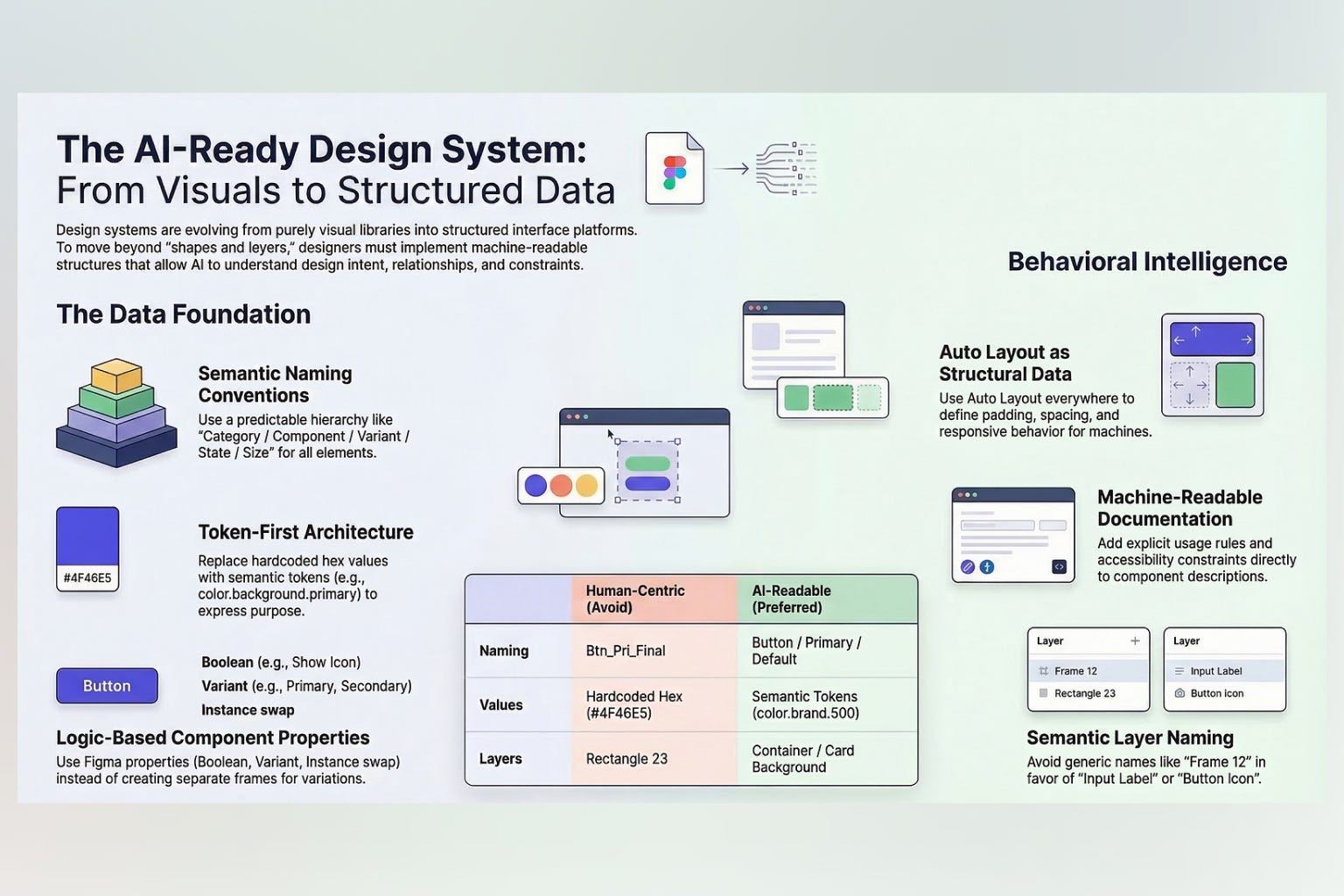
Your Design System Needs to Be AI-Readable
This is probably the most important takeaway from everything that's happening right now. The quality of your design system's documentation and structure directly determines how useful AI tools are for your team.
An AI model doesn't look at your Figma file and think "oh, that's a card component with 8px padding." It reads your code, your tokens file, your component documentation. If that stuff is messy, inconsistent, or incomplete, the AI generates messy, inconsistent, incomplete code.
What Makes a Design System "AI-Ready"
Based on what I've seen working and failing across multiple teams:
Token structure matters enormously. If your spacing tokens are space-sm, space-md, space-lg in some files and spacing-1, spacing-2, spacing-3 in others, AI tools get confused. Consistency isn't just for humans anymore.
Component documentation needs to be explicit. Not just "here's a Button component." But "Button accepts size (sm, md, lg), variant (primary, secondary, ghost, danger), and can optionally include a leading icon via the icon prop." The more explicit you are, the better the AI output.
File organization follows conventions. AI tools work best when your component files follow predictable patterns. ComponentName/index.tsx, ComponentName/styles.ts, ComponentName/types.ts. Every team does it slightly differently, but doing it consistently is what matters.
Design tokens are the single source of truth. Not Figma variables. Not CSS variables. Not Tailwind config. One canonical source that generates everything else. This gives AI one place to look rather than reconciling three different representations.
The Figma MCP Connection
Figma MCP (Model Context Protocol) is probably the most significant development for design-to-code workflows this year. It's an integration that lets AI tools directly read and understand your Figma design system. Components, tokens, patterns, relationships between elements.
What this means in practice: you can point an AI tool at your Figma file and say "generate a React component that matches the Card component in our design system." And it actually understands what that means because it can read the Figma source directly.
Before MCP, this was a manual process. Export from Figma. Describe to the AI what you want. Hope it gets close. Iterate. Now the AI has direct access to the design source. The gap between design intent and code output got dramatically smaller.
AI as a Component Factory
Here's where things get genuinely powerful. AI can turn your design system into a component factory that auto-generates variants, code, and documentation from your existing tokens and libraries.

Generating Component Variants
Say you have a base Card component. You need variants for:
- Horizontal and vertical layouts
- With and without images
- Compact for mobile, expanded for desktop
- Interactive (clickable) and static
- With different content types (text, stats, user profiles)
That's potentially 30+ distinct variants when you factor in all the combinations. Manually building and documenting each one is brutal work. AI can generate these variants from your base component and design tokens in minutes. Not all of them will be perfect. But they'll be 80-90% right, which means you're doing finishing work instead of building from scratch.
Auto-Generated Documentation
This one's been a game changer for us. AI tools can now:
- Generate Storybook stories from component code
- Write usage guidelines based on how components are actually used in the codebase
- Create migration guides when components change
- Build accessibility documentation by analyzing component structure
We used to have a dedicated half-day every sprint just for documentation. Now it's maybe an hour of review and editing. The AI generates the first draft, and we make sure it's accurate and matches our voice.
The Quality Control Problem
I need to be honest here. AI-generated components need review. Always. I've seen cases where:
- AI uses a token that exists but isn't appropriate for the context
- Accessibility attributes are missing or wrong
- Edge cases aren't handled (empty states, overflow, long text)
- The component works but doesn't match the design system's pattern conventions
The failure mode isn't "terrible code." It's "code that looks right but has subtle issues." Which is actually harder to catch than obviously wrong code. So you need people who deeply understand your design system reviewing AI output. AI accelerates the work. It doesn't replace the expertise.
ShadCN Changed the Game (And AI Made It Better)
I can't write about design systems in 2026 without talking about ShadCN. It kind of rewrote the rules for how component libraries work.
The core idea is deceptively simple: instead of installing a monolithic component library like Material UI or Chakra, you copy individual component files into your project. You own the code completely. You modify it freely. There's no fighting the library's opinions.
What makes this relevant to AI is that ShadCN components are self-contained, well-structured, and follow predictable patterns. AI tools love this. They can read a ShadCN component, understand its structure, and generate new components that follow the same patterns.
Teams are using ShadCN as a foundation and then using AI to:
- Restyle components to match their brand
- Generate new components that follow ShadCN's patterns
- Create complex compositions from base components
- Build entire page layouts from component primitives
The flexibility is remarkable. I've seen teams use ShadCN components styled to look exactly like Material Design, Ant Design, or completely custom. The AI just needs to understand the styling approach and it can transform the visual language while keeping the structural patterns intact.
Why This Model Is Winning
Traditional component libraries had a fundamental tension: they wanted to be both opinionated (for consistency) and flexible (for customization). AI resolves this tension. You start with an opinionated base (ShadCN's structure) and use AI to customize it to your exact needs. Best of both worlds.
Plus, when your components live in your codebase rather than in node_modules, AI has full context. It can see how you've modified components, what patterns you've established, and generate new code that matches. With third-party libraries, the AI is guessing at how you've configured and extended things.
Design Tokens: The AI-Friendly Foundation
Design tokens have been around for years. But in 2026, they've become the critical bridge between design and AI-powered development.
Tokens are structured data. Colors, spacing, typography, shadows, borders, motion. All defined in a machine-readable format. AI tools can parse this data instantly and use it to make informed decisions about component generation.
Token-Driven AI Generation
Here's a practical example. Say your design tokens define:
color-primary-500: #3B82F6spacing-4: 16pxradius-md: 8pxshadow-sm: 0 1px 2px rgba(0,0,0,0.05)font-body: Inter, 16px/1.5
An AI tool can read these tokens and generate a component that uses them correctly. Not hardcoded values. Actual token references. This means the generated component automatically updates when tokens change, stays consistent with the rest of the system, and follows your design decisions.

The teams I've seen struggle with AI adoption are almost always the teams with poorly structured or incomplete token systems. If half your styles are tokens and half are hardcoded values, the AI doesn't know which approach to use. Fix your tokens first. Then the AI tools become dramatically more useful.
Token Translation Across Platforms
Here's where it gets interesting. Design tokens in a standard format (like W3C Design Token Community Group format) can be translated to any platform:
- CSS custom properties for web
- Swift/Kotlin values for native mobile
- Figma variables for design
- Tailwind config for utility-first CSS
AI tools are getting good at managing these translations. Change a token value once, and AI-assisted pipelines can propagate that change across every platform automatically. We had a brand color update last month that touched web, iOS, Android, and email templates. The whole thing took about two hours including QA. A year ago that was a multi-day effort.
The Tools That Actually Matter Right Now
I've tried a lot of AI design tools this year. Most of them are fine but forgettable. Here are the ones that actually changed how my team works:
For Design-to-Code
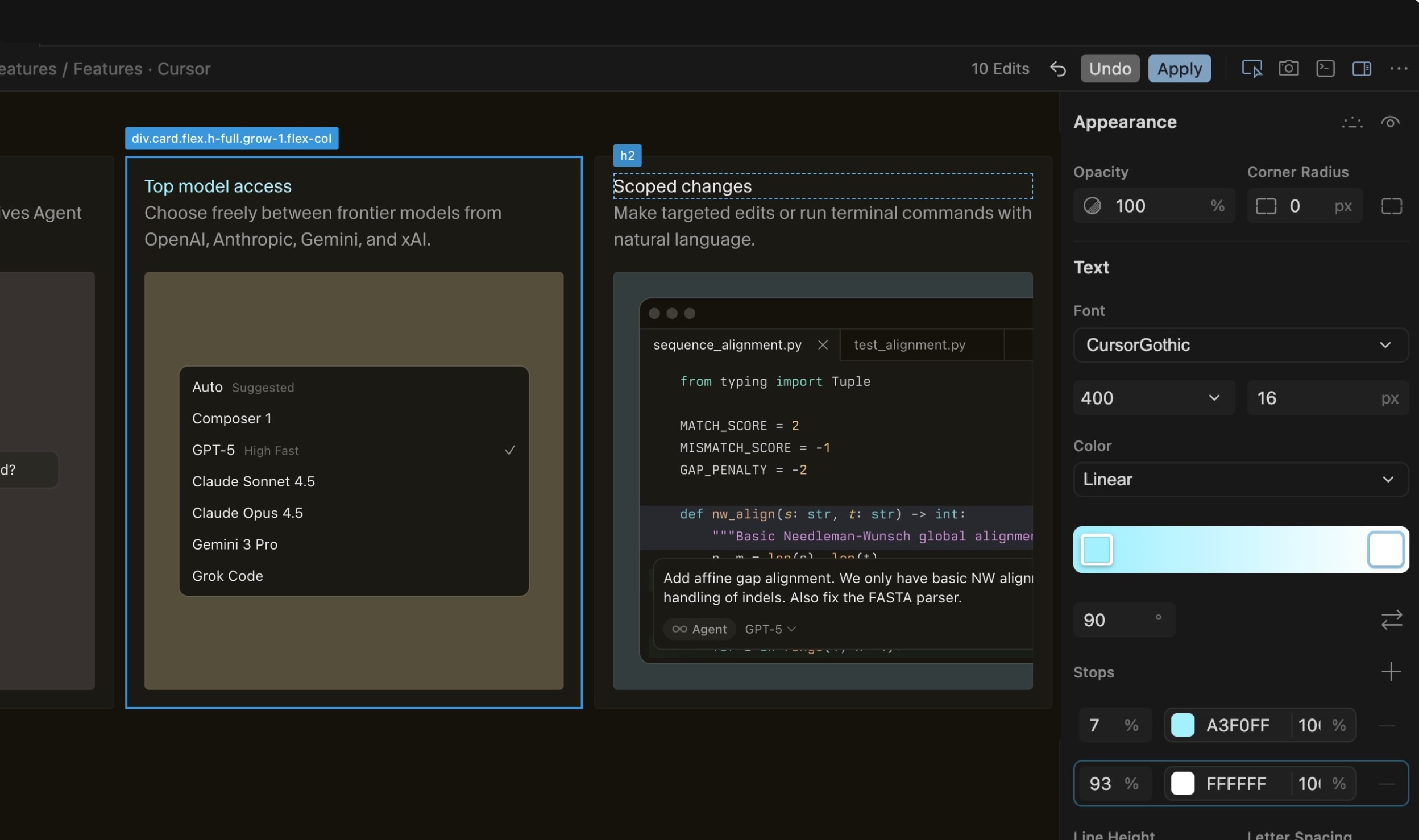
Cursor IDE is probably the most impactful tool for designers writing code. The AI understands your project context, reads your existing components, and generates code that actually fits. It's not perfect, but it's way past the "neat demo" stage.
Claude Code is what I use for bigger refactoring tasks. Migrating design tokens, restructuring component architectures, generating documentation. It handles complex multi-file changes better than anything else I've used.
Vercel's v0 generates UI components from text descriptions. Useful for quick prototyping and exploring component ideas. The output uses ShadCN and Tailwind, so it integrates well with modern stacks.
For Design System Management
Figma with AI features has gotten significantly better for design system work. The AI can suggest component variants, identify inconsistencies, and help maintain design libraries at scale.
Storybook with AI plugins auto-generates stories, visual tests, and documentation. The test generation is particularly useful since it catches visual regressions that manual testing misses.
Chromatic for visual regression testing of AI-generated components. When AI is producing component variants, automated visual testing becomes essential.
For Token Management
Style Dictionary remains the standard for token transformation. AI tools integrate well with its pipeline.
Tokens Studio (formerly Figma Tokens) bridges Figma variables and code tokens. The AI integration for token generation and optimization is new this year and surprisingly useful.
What the AI Design Systems Conference Revealed
The AI Design Systems Conference happened this month (March 19-20, 2026) with speakers from Figma, Adobe, GitHub, WhatsApp, Miro, and Atlassian. Some takeaways that stuck with me:
Design systems are becoming AI interfaces. Multiple speakers made the point that design systems aren't just for human designers and developers anymore. They're the interface through which AI tools understand and generate UI. This changes how you should think about documentation, structure, and naming.
The "ambient intelligence" concept is emerging. Instead of AI being a tool you invoke explicitly, some teams are embedding AI rules directly into their design systems. Components that automatically suggest better alternatives. Tokens that flag accessibility issues. Layouts that self-optimize based on content.
The designer-developer gap is narrowing, not widening. I expected AI to increase specialization. Instead, it's doing the opposite. Designers can now do development tasks. Developers can make design decisions informed by AI that understands the design system. The roles are blurring.
Real Talk: What Doesn't Work Yet
I want to be balanced here because the hype around AI in design is intense. Here's what I've found doesn't work well:
Complex Component Logic
AI can generate the visual structure of a component reliably. But complex interaction logic? State management? Edge case handling? It still struggles. A dropdown menu that handles keyboard navigation, focus trapping, screen reader announcements, and all the ARIA states correctly? You need a human for that. Or at least a human reviewing very carefully.
Brand Voice in Documentation
AI can write technically accurate documentation. But making it sound like your team wrote it? That takes editing. Every team has a documentation voice, and AI tends to homogenize it into that generic tech-writing style that's correct but lifeless.
Cross-Component Consistency
AI is great at generating individual components. It's less great at ensuring those components work together harmoniously. Spacing feels off. Visual weight is inconsistent. The overall composition doesn't feel cohesive. These are the kinds of things that require a designer's eye for the whole system, not just the parts.
Migration and Evolution
AI can help you build a new design system. It's much worse at evolving an existing one. The nuanced decisions about what to deprecate, what to change, what to leave alone. These require understanding the system's history and the team's constraints. AI doesn't have that context.
Where This Is All Going
I think we're heading toward a world where design systems are living, adaptive things. Not static libraries of components, but intelligent systems that respond to context, suggest improvements, and generate what's needed on demand.
That sounds kind of utopian, and the reality will probably be messier. But the direction is clear. Every major design tool company is investing heavily in AI. Every design systems conference is talking about it. And the teams I know that have leaned into AI tooling are shipping faster with fewer inconsistencies.
My advice? Start with your tokens. Make them clean, consistent, and complete. Then structure your components predictably. Document explicitly. These things make your design system better for humans AND for AI. You can't lose.
The AI tooling will keep improving. But a well-structured design system is valuable regardless of what tools you use. So invest there first. The AI benefits come naturally when the foundation is solid.
And yeah, the job is changing. But I've been doing design systems work since before they were called design systems, and the job has always been changing. The constants remain: consistency, clarity, and making it easy for other people to build good things. AI just gives us better tools to get there.